Categories
Product Reviews

ASUS ROG Strix GA35 Review

Introduction: ASUS ROG Strix GA35 Review

Welcome to my ASUS ROG Strix GA35 Review! I hope that in this article you will find the information you are about to receive to be very helpful in deciding if this piece of technology is right for you. This 2023 unbiased ASUS ROG Strix GA35 Review will inform you of all of the machines bells and whistles and what to expect when getting this machine! Let’s jump into it!

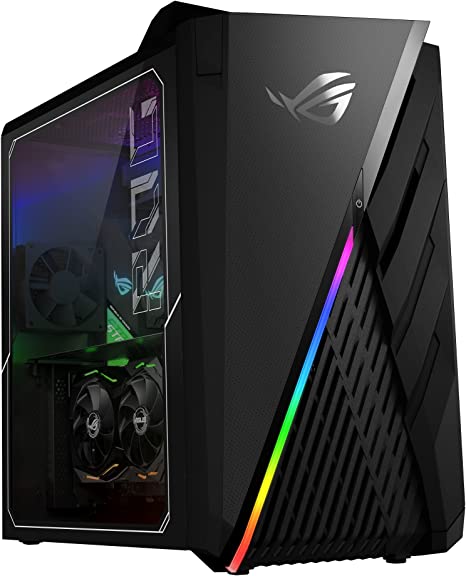
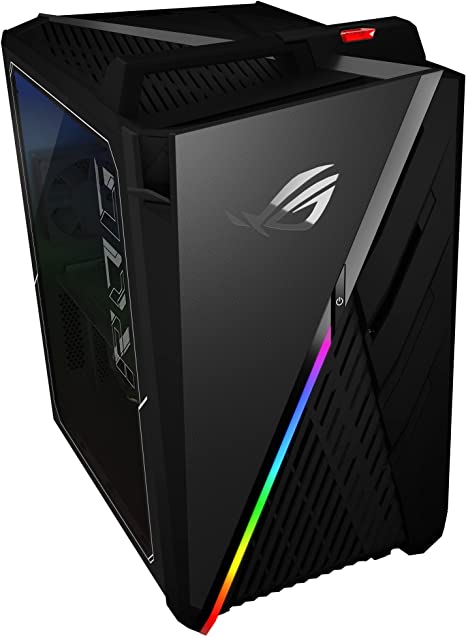
The ASUS ROG Strix GA35 Gaming Desktop PC is a high-end gaming desktop meticulously crafted to meet the demands of serious gamers. Firstly, the device boasts a potent AMD Ryzen 9 5900X processor. Moreover, it is equipped with a powerful NVIDIA GeForce RTX 3090 graphics card, ensuring stunning visuals and seamless gaming experiences. Additionally, the system is fortified with 32GB of high-speed DDR4 RAM, enhancing multitasking capabilities and overall performance.

In terms of storage, the ASUS ROG Strix GA35 doesn’t disappoint. With a well-thought-out combination of a 1TB PCIe SSD and a capacious 2TB HDD, users can expect swift loading times and ample space for their gaming library. In conclusion, this gaming desktop is a powerhouse that delivers top-notch performance across the board, making it an ideal choice for gamers who demand nothing but the best.

The device also features dual hot-swap SSD bays, ROG Scope & Chakram, and Windows 11 Professional. In this review, we will be looking at the ASUS ROG Strix GA35 in detail, evaluating its performance, design, features, and overall value.

ASUS ROG Strix GA35 Review
ASUS ROG Strix GA35 Review
ASUS ROG Strix GA35
Processor4.8 GHz ryzen_9
Hard Drive2 TB SSD
Graphics CoprocessorNvidia Ge Force Rtx 3090
Chipset BrandNVIDIA
Card Description‎RTX 3090
Graphics Card RAM Size24 GB
Number of USB 3.0 Ports2
BrandASUS
SeriesROG Strix GA35
Item Model NumberGA35DX-XH999
Hardware PlatformWindows
Operating SystemWindows 11 Pro
Item Weight33 Pounds
Product Dimensions11 x 17 x 19.7 inches
Item Dimensions LxWxH11 x 17 x 19.7 inches
ColorBlack
Processor BrandAMD
Computer Memory TypeDDR4 SDRAM
Flash Memory Size1 TB
Hard Drive InterfaceeSATA
Hard Drive Rotational Speed7200 RPM
Batteries1 Lithium Metal batteries required. (included)
Best Place to BuyBuy on Amazon
ASUS ROG Strix GA35 Specifications

Design and Build: ASUS ROG Strix GA35 Review

Sporting a sleek and stylish design, the ASUS ROG Strix GA35 Gaming Desktop PC stands out with a black brushed-metal chassis and vibrant RGB lighting accents. Moreover, beyond mere aesthetics, the device places a strong emphasis on durability and performance. Seamlessly integrating a sturdy and robust construction capable of enduring the challenges of intense gaming, this desktop ensures a reliable and enduring gaming experience. This dual focus on both form and function enhances not only the visual appeal but also the resilience of the desktop, making it a compelling choice for gaming enthusiasts who seek both style and substance in their gaming setups. This focus on both form and function ensures that the desktop not only enhances your gaming experience with its visual appeal but also stands up to the demands of rigorous gameplay, making it a reliable and attractive choice for gaming enthusiasts.

The device features a variety of connectivity options, including USB 3.2 Gen 2 Type-A and Type-C ports, HDMI, DisplayPort, and Ethernet. The device also features Wi-Fi 6 and Bluetooth 5.1, ensuring fast and reliable wireless connectivity.

Other Qualities

The device is complemented by a diverse array of gaming peripherals, chief among them being the ROG Scope and Chakram gaming mouse. To begin with, the ROG Scope is a high-performance gaming mouse that goes above and beyond. Equipped with a customizable DPI range, it provides users with precision control. In addition, its six programmable buttons offer a tailored gaming experience, while the ergonomic design ensures comfort during extended gaming sessions.

On the other hand, the Chakram gaming mouse takes gaming to a new level with its innovative features. Notably, it features a programmable joystick, adding a dynamic element to gameplay. Furthermore, users can fine-tune their experience with adjustable DPI settings, catering to individual preferences. The customizable RGB lighting adds a touch of personalization, creating an immersive gaming atmosphere.

In summary, with the inclusion of these cutting-edge peripherals, the device not only offers high-performance hardware but also ensures a complete gaming package that enhances both precision and enjoyment.

Performance: ASUS ROG Strix GA35 Review

The ASUS ROG Strix GA35 Gaming Desktop PC features the latest AMD Ryzen 9 5900X processor, delivering exceptional performance. The processor is capable of reaching speeds of up to 4.8GHz, making it ideal for demanding gaming applications.

The device features the NVIDIA GeForce RTX 3090 graphics card, offering excellent graphics performance and supporting 4K gaming. The graphics card is also compatible with ray tracing technology, which provides realistic lighting and shadows in games.

The device comes with 32GB DDR4 RAM, which ensures smooth multitasking and quick application launches. The device also features 1TB PCIe SSD + 2TB HDD storage, which provides ample space for storing games and files.

The device features dual hot-swap SSD bays, which allow users to easily swap out SSDs for upgrades or maintenance. The device comes pre-installed with Windows 11 Professional, an operating system optimized for performance and gaming.

Connectivity:

The ASUS ROG Strix GA35 Gaming Desktop PC comes with a range of connectivity options, including USB 3.2 Gen 2 Type-A and Type-C ports, HDMI, DisplayPort, and Ethernet. The device also features Wi-Fi 6 and Bluetooth 5.1, ensuring fast and reliable wireless connectivity.

The device also features a range of gaming peripherals, such as the ROG Scope and Chakram gaming mouse, facilitating easy gaming and device navigation.

Battery Life:

The ASUS ROG Strix GA35 Gaming Desktop PC lacks a battery since it is designed for use as a desktop computer.

ASUS ROG Strix GA35 Review
Side View

Ease of Use: ASUS ROG Strix GA35 Review

The design of the ASUS ROG Strix GA35 Gaming Desktop PC prioritizes user-friendliness, incorporating a variety of features and tools that facilitate easy navigation and usage. The device features a range of connectivity options, making it easy to connect to peripherals and devices. The device also comes with gaming peripherals, including the ROG Scope and Chakram gaming mouse, making it easy to play games and navigate the device.

The device is pre-installed with Windows 11 Professional, which is optimized for performance and gaming. The operating system is user-friendly, with a range of customization options and tools that make it easy to personalize the device to suit individual needs.

Value: ASUS ROG Strix GA35 Review

The ASUS ROG Strix GA35 Gaming Desktop PC comes with a premium price tag of around $4,299.99. Nevertheless, the device justifies its cost with a rich set of features and high-performance capabilities. The device is ideal for serious gamers who require a high level of performance and graphics capabilities in a gaming desktop.

One of the main selling points of the ASUS ROG Strix GA35 Gaming Desktop PC is its build quality. The device is built to withstand the rigors of heavy gaming, with a sturdy and robust construction that can handle prolonged gaming sessions. The device also features a variety of connectivity options, making it easy to connect to peripherals and devices.

The device is equipped with the latest AMD Ryzen 9 5900X processor and NVIDIA GeForce RTX 3090 graphics card, which provide excellent performance and graphics capabilities. The device also features ample storage space and comes with a range of gaming peripherals, making it a great value for serious gamers.

One potential downside of the device is its premium price tag, which may be out of reach for some gamers. Additionally, the device’s large size may not be suitable for users with limited desk space.

Pros and Cons: ASUS ROG Strix GA35 Review

Pros:

  • Excellent performance and graphics capabilities
  • Stylish design and sturdy build quality
  • Ample storage space
  • Range of connectivity options
  • Comes with gaming peripherals
  • Dual hot-swap SSD bays
  • Pre-installed with Windows 11 Professional

Cons:

  • Premium price tag
  • Large size may not be suitable for users with limited desk space

Customer Reviews: ASUS ROG Strix GA35 Review

The ASUS ROG Strix GA35 Gaming Desktop PC has received positive reviews from customers who have purchased and used the device. Customers have praised the device’s performance, design, and build quality.

Many customers have commented on the device’s performance capabilities, noting that the AMD Ryzen 9 5900X processor and NVIDIA GeForce RTX 3090 graphics card provide excellent performance and graphics capabilities. Customers have also appreciated the device’s ample storage space, making it easy to store games and files.

Customers have also praised the device’s design and build quality, noting that the black brushed-metal chassis looks stylish and robust. Customers have also appreciated the device’s range of connectivity options, making it easy to connect to peripherals and devices.

However, some customers have noted that the device’s premium price tag may be a barrier for some users. Additionally, some customers have noted that the device’s large size may not be suitable for users with limited desk space.

ASUS ROG Strix GA35 3
Customer Reviews

Final Verdict: ASUS ROG Strix GA35 Review

The ASUS ROG Strix GA35 Gaming Desktop PC stands out as an exceptional choice for serious gamers seeking high performance and graphics capabilities. With the latest AMD Ryzen 9 5900X processor and NVIDIA GeForce RTX 3090 graphics card, the device delivers exceptional gaming performance and graphics capabilities.

The device is built with a focus on durability and performance, with a sturdy and robust construction that can withstand the rigors of heavy gaming. The device also features a range of connectivity options, making it easy to connect to peripherals and devices.

While the device may come with a premium price tag, it is well worth the investment for serious gamers who demand the best in terms of performance, graphics capabilities, and build quality. Overall, the ASUS ROG Strix GA35 Gaming Desktop PC is a solid choice for serious gamers who require a high level of performance and graphics capabilities in a gaming desktop.

Thanks For Reading!

I would like to take this opportunity to thank you very much for reading this ASUS ROG Strix GA35 Review for 2023. I hope that this article has provided you with enough information to decide whether or not this machine is perfect for your home and if it will deliver everything you need a great piece of technology to deliver. At the very most I hope this ASUS ROG Strix GA35 Review was enjoyable to read. Thanks again and I hope you enjoyed it!

Want to check out my other reviews go to https://thetechworldguru.com/category/computer-reviews/ for more reviews.
ASUS ROG Strix GA35 Review
Processor4.8 GHz ryzen_9
Hard Drive2 TB SSD
Graphics CoprocessorNvidia Ge Force Rtx 3090
Chipset BrandNVIDIA
Card Description‎RTX 3090
Graphics Card RAM Size24 GB
Number of USB 3.0 Ports2
BrandASUS
SeriesROG Strix GA35
Item Model NumberGA35DX-XH999
Hardware PlatformWindows
Operating SystemWindows 11 Pro
Item Weight33 Pounds
Product Dimensions11 x 17 x 19.7 inches
Item Dimensions LxWxH11 x 17 x 19.7 inches
ColorBlack
Processor BrandAMD
Computer Memory TypeDDR4 SDRAM
Flash Memory Size1 TB
Hard Drive InterfaceeSATA
Hard Drive Rotational Speed7200 RPM
Batteries1 Lithium Metal batteries required. (included)
Best Place to BuyBuy on Amazon
ASUS ROG Strix GA35 Specifications
Disclosure:

In 2015, the Federal Trade Commission released its new rules for Disclosure Compliance. These rules are set in place to ensure that readers or viewers of web media (blogs, YouTube videos, etc.) know if the blogger/presenter is sponsored, endorsed, or partnered with a different company. In blog terms, the readers need to know if the blogger is making money by sharing a link or product.

In compliance with the FTC guidelines, please assume the following about links and posts on this site: Any/all of the links https://thetechworldguru.com/​ are affiliate links of which I receive a small compensation from sales of certain items.

Categories
Product Reviews

Dell Latitude 9420 Review

Introduction: Dell Latitude 9420 Review

Welcome to my Dell Latitude 9420 Review! I hope that in this article you will find the information you are about to receive to be very helpful in deciding if this piece of technology is right for you. This 2023 unbiased Dell Latitude 9420 Review will inform you of all of the machines bells and whistles and what to expect when getting this machine! Let’s jump into it!

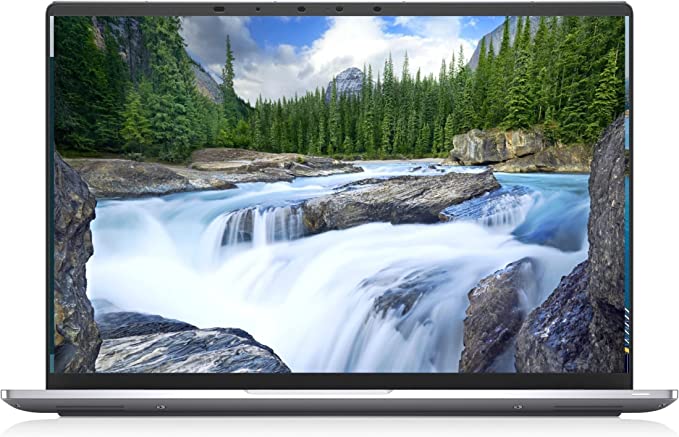
The Dell Latitude 9000 9420 stands as a premium business notebook tailored for professionals. It boasts the latest Intel Core i7 11th Gen i7-1185G7 Quad-core processor, coupled with 16 GB of RAM and a 256 GB SSD for robust performance. Featuring a sleek Titan Gray design, this notebook prioritizes performance, durability, and security to meet the demands of modern professionals. In this Dell Latitude 9420 Review, we will be looking at the Dell Latitude 9000 9420 in detail, evaluating its performance, design, features, and overall value.

Dell Latitude 9420 Review

Dell Latitude 9420 Review
Dell Latitude 9420
Standing Screen Display Size14 Inches
Screen Resolution1920 x 1200 pixels
Max Screen Resolution1920 x 1200 pixels
Processor3 GHz core_i7
Hard Drive256 GB SSD
Graphics CoprocessorIntel Iris Xe Graphics
Chipset BrandIntel
Card DescriptionIris Xe Graphics
BrandDell
SeriesLatitude 9000
Item Model Number9420
Hardware PlatformPC
Operating SystemWindows 10 Pro
Item Weight5.53 Pounds
Product Dimensions15.4 x 13.5 x 2.9 inches
Item Dimensions LxWxH15.4 x 13.5 x 2.9 inches
ColorTitan Gray
Processor BrandIntel
Number of Processors1
Optical Drive TypeNo Information Available
Voltage240 Volts
Best Place to BuyBuy on Amazon
Dell Latitude 9420 Specifications

Design and Build: Dell Latitude 9420 Review

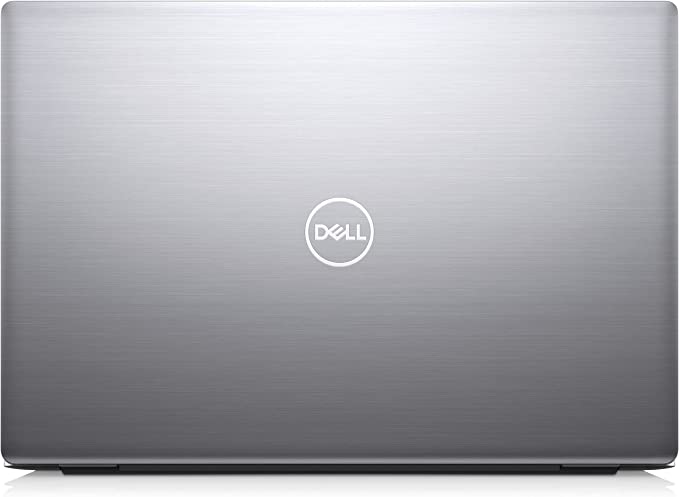
The design of the Dell Latitude 9000 9420 prioritizes durability and portability. The device features a sleek and slim design, with a thickness of just 0.7 inches and a weight of only 2.68 pounds. The device is easy to carry around, making it ideal for professionals who need to work on the go.

The device features a 14-inch Full HD Plus display with a resolution of 1920 x 1200, which provides crisp and clear images. The display is also bright and vibrant, making it easy to work in different lighting conditions.

The device features a backlit keyboard with a comfortable typing experience, making it easy to work for extended periods. The touchpad is smooth and responsive, making it easy to navigate the device.

Performance: Dell Latitude 9420 Review

The Dell Latitude 9000 9420 delivers exceptional performance with its latest Intel Core i7 11th Gen i7-1185G7 Quad-core processor. The processor is capable of reaching speeds of up to 3 GHz, making it ideal for demanding applications such as video editing and 3D modeling. The device comes with 16 GB of RAM, which ensures smooth multitasking and quick application launches.

The device features 256 GB of SSD storage, which provides ample space for storing files and applications. The SSD is fast and reliable, ensuring quick boot times and fast data transfers.

The device comes pre-installed with Windows 10 Pro, an operating system optimized for performance and security. The device also comes with a range of security features, including a fingerprint scanner and an IR camera, which ensures secure login and authentication.

Connectivity:

The Dell Latitude 9000 9420 comes with a range of connectivity options, including Thunderbolt 4 ports, USB 3.2 Gen 2 ports, HDMI, Ethernet, and a headphone/microphone combo jack. The Thunderbolt 4 ports are capable of delivering up to 40 Gbps of data transfer, making it ideal for professionals who require fast data transfers. The device also features Wi-Fi 6 and Bluetooth 5.1, ensuring fast and reliable wireless connectivity.

Battery Life:

The Dell Latitude 9000 9420 comes with a 63Wh battery, which provides ample battery life for professionals on the go. The device is capable of delivering up to 13 hours of battery life, depending on usage. The device also comes with ExpressCharge technology, which ensures fast charging times.

Dell Latitude 9420 Review
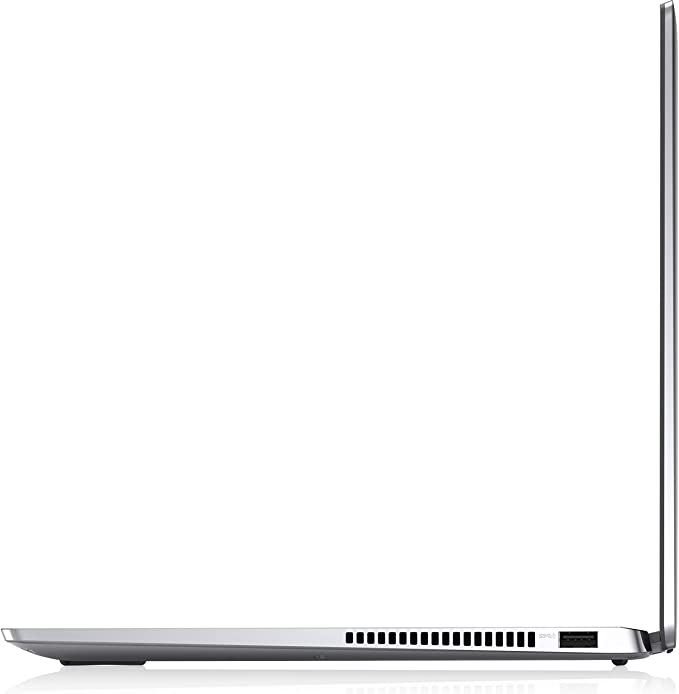
Top View of The Dell Latitude 9420

Ease of Use: Dell Latitude 9420 Review

The design of the Dell Latitude 9000 9420 prioritizes ease of use, incorporating a variety of features and tools to facilitate navigation and operation. It caters to both novice and advanced users, offering simple setup wizards and intuitive controls.

The device features a backlit keyboard that is comfortable to type on, with well-spaced keys that provide a satisfying tactile feedback. The touchpad is smooth and responsive, making it easy to navigate the device. The device also comes with a range of gesture controls, such as pinch-to-zoom and swipe-to-scroll, which make it easy to interact with applications and files.

Operating system

The device comes pre-installed with Windows 10 Pro, an operating system optimized for performance and user-friendly functionality. The operating system is user-friendly, with a range of customization options and tools that make it easy to personalize the device to suit individual needs.

Connectivity

The device also comes with a range of connectivity options, including Thunderbolt 4 ports, USB 3.2 Gen 2 ports, HDMI, Ethernet, and a headphone/microphone combo jack. These connectivity options make it easy to connect to a range of peripherals and devices, such as external displays, hard drives, and printers.

The device also features Wi-Fi 6 and Bluetooth 5.1, ensuring fast and reliable wireless connectivity. The device is easy to set up and configure, with simple setup wizards that guide users through the process of connecting to a network and setting up security features.

The device also comes with a range of pre-installed applications and tools, including Dell Optimizer, which provides a range of system optimization and management tools. The device also comes with a range of security features, including a fingerprint scanner and an IR camera, which ensures secure login and authentication.

Overall

Overall, the Dell Latitude 9000 9420 is easy to use and navigate, with a range of features and tools that make it a valuable tool for professionals. The device caters to professionals seeking a business notebook with high performance and durability, offering ease of use and configuration.

Value: Dell Latitude 9420 Review

The Dell Latitude 9000 9420 is priced at around $2,500, which is a premium price tag. However, the device is packed with features and performance capabilities that justify its price. The device is ideal for professionals who require a high level of performance and portability in a business notebook.

One of the main selling points of the Dell Latitude 9000 9420 is its build quality. The device is built to withstand the rigors of daily use, with a sturdy magnesium alloy chassis that is designed to withstand drops, bumps, and other types of impact.

Another advantage of the Dell Latitude 9000 9420 is its security features. The device comes with a range of security features, including a fingerprint scanner and an IR camera, which ensures secure login and authentication. The device is also equipped with Windows 10 Pro, which is optimized for security and performance.

Price:

This Particular Dell Latitude 9420 With the Bells and Whistles retails around $3,378.40. It is well worth that though for all the amazing things you get with it.

Pros and Cons: Dell Latitude 9420 Review

Pros:

  1. Excellent Performance – The Dell Latitude 9000 9420 is equipped with the latest Intel Core i7 11th Gen i7-1185G7 Quad-core processor, 16 GB of RAM, and 256 GB of SSD storage, making it ideal for demanding applications such as video editing and 3D modeling.
  2. Durable and Sturdy Build – The device is built with a durable magnesium alloy chassis that is both sturdy and lightweight, making it easy to carry around.
  3. Security Features – The device comes with a range of security features, including a fingerprint scanner and an IR camera, which ensures secure login and authentication.
  4. Connectivity Options – The device comes with a range of connectivity options, including Thunderbolt 4 ports, USB 3.2 Gen 2 ports, HDMI, Ethernet, and a headphone/microphone combo jack, making it easy to connect to a range of peripherals and devices.
  5. Portability – The device is slim and lightweight, making it easy to carry around and ideal for professionals who need to work on the go.

Cons:

  1. Premium Price Tag – The device comes with a premium price tag, which may make it difficult for some users to justify the cost.
  2. Limited Storage Capacity – The device comes with only 256 GB of SSD storage, which may not be enough for users who require more storage space.
  3. Limited Graphics Options – The device comes with integrated Intel Iris Xe Graphics, which may not be sufficient for professionals who require a higher level of graphics performance.
  4. Limited Display Options – The device only comes with a Full HD Plus display, which may not be sufficient for professionals who require a higher level of resolution and color accuracy.
  5. Limited Upgrade Options – The device is not easily upgradeable, which may be a disadvantage for users who require more storage or RAM.
Dell Latitude 9420 Review

Customer Reviews: Dell Latitude 9420 Review

The Dell Latitude 9000 9420 has received positive reviews from customers who have purchased and used the device. Customers have praised the device’s performance, build quality, and security features.

Customers have commented on the device’s build quality, noting that the magnesium alloy chassis feels sturdy and durable. Customers have also appreciated the device’s portability, with many noting that the device is slim and lightweight, making it easy to carry around.

Many customers have praised the device’s performance capabilities, noting that the Intel Core i7 processor and 16 GB of RAM provide more than enough power for demanding applications. Customers have also noted that the SSD storage provides fast boot times and quick application launches.

Customers have also appreciated the range of connectivity options available on the device, including Thunderbolt 4 ports and Wi-Fi 6. Customers have also praised the device’s security features, including the fingerprint scanner and IR camera.

However, some customers have noted that the device’s premium price tag may be a barrier for some users, and that the device’s limited storage and graphics options may not be ideal for all users.

Final Verdict: Dell Latitude 9420 Review

The Dell Latitude 9000 9420 is an excellent business notebook that is well-suited for professionals who require a high level of performance, portability, and security. The device is packed with features, including a powerful processor, ample RAM and storage, and a range of connectivity options.

The device is also easy to use and navigate, with a user-friendly operating system and intuitive controls. The device’s build quality is excellent, with a sturdy magnesium alloy chassis that is designed to withstand the rigors of daily use.

While the device may come with a premium price tag and limited upgrade options, it is well worth the investment for professionals who require a high level of performance and durability in a business notebook. The device is ideal for professionals in fields such as business, finance, and technology who require a reliable and easy-to-use device that can handle demanding applications and tasks.

Overall, the Dell Latitude 9000 9420 is a solid choice for professionals who require a high-quality, portable, and easy-to-use business notebook. The device’s performance, durability, and security features make it an excellent investment for professionals who require a device that can keep up with their demanding workloads.

Thanks For Reading!

I would like to take this opportunity to thank you very much for reading this Dell Latitude 9420 Review for 2023. I hope that this article has provided you with enough information to decide whether or not this machine is perfect for your home and if it will deliver everything you need a great piece of technology to deliver. At the very most I hope this Dell Latitude 9420 Review was enjoyable to read. Thanks again and I hope you enjoyed it!

Want to check out my other reviews go to https://thetechworldguru.com/category/computer-reviews/ for more reviews.

DELL LATITUDE 4
Standing Screen Display Size14 Inches
Screen Resolution1920 x 1200 pixels
Max Screen Resolution1920 x 1200 pixels
Processor3 GHz core_i7
Hard Drive256 GB SSD
Graphics CoprocessorIntel Iris Xe Graphics
Chipset BrandIntel
Card DescriptionIris Xe Graphics
BrandDell
SeriesLatitude 9000
Item Model Number9420
Hardware PlatformPC
Operating SystemWindows 10 Pro
Item Weight5.53 Pounds
Product Dimensions15.4 x 13.5 x 2.9 inches
Item Dimensions LxWxH15.4 x 13.5 x 2.9 inches
ColorTitan Gray
Processor BrandIntel
Number of Processors1
Optical Drive TypeNo Information Available
Voltage240 Volts
Best Place to BuyBuy on Amazon
Dell Latitude 9420 Specifications
Disclosure:

In 2015, the Federal Trade Commission released its new rules for Disclosure Compliance. These rules are set in place to ensure that readers or viewers of web media (blogs, YouTube videos, etc.) know if the blogger/presenter is sponsored, endorsed, or partnered with a different company. In blog terms, the readers need to know if the blogger is making money by sharing a link or product.

In compliance with the FTC guidelines, please assume the following about links and posts on this site: Any/all of the links https://thetechworldguru.com/​ are affiliate links of which I receive a small compensation from sales of certain items.
Categories
Product Reviews

Thinkpad P15 Gen 2 Review

Introduction:

Welcome to my Thinkpad P15 Gen 2 Review! I hope that in this article you will find the information you are about to receive to be very helpful in deciding if this piece of technology is right for you. This 2023 unbiased Thinkpad P15 Gen 2 Review will inform you of all of the machines bells and whistles and what to expect when getting this machine! Let’s jump into it!

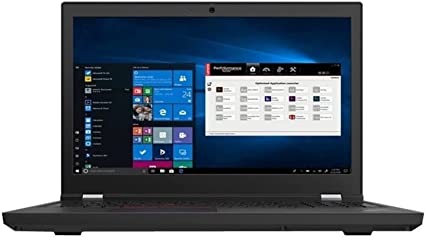
The Lenovo ThinkPad P15 Gen 2 20YQ0083US stands as a mobile workstation crafted to meet the requirements of professionals. It features the latest Intel Core i7 11th Gen i7-11800H Octa-core processor, 32 GB of RAM, and a capacious 1 TB SSD. The device boasts a sleek black design and prioritizes performance, durability, and security. In this Thinkpad P15 Gen 2 review, we will be looking at the Lenovo ThinkPad P15 Gen 2 20YQ0083US in detail, evaluating its performance, design, features, and overall value.

Thinkpad P15 Gen 2 Review

Thinkpad P15 Gen 2 Review
Thinkpad P15 Gen 2
Standing Screen Display Size15.6 Inches
Screen Resolution1920 x 1080 pixels
Max Screen Resolution1920 x 1080 pixels
Processor2.3 GHz core_i7
Hard Drive1 TB SSD
Graphics CoprocessorNVIDIA RTX A4000
Chipset BrandNVIDIA
Card DescriptionRTX A4000
Graphics Card RAM Size8 GB
BrandLenovo
SeriesThinkPad P15 Gen 2
Item Model Number20YQ0083US
Hardware PlatformPC
Operating SystemWindows 11 Pro
Item Weight6.32 Pounds
Product Dimensions16.24 x 3.24 x 11.67 inches
Item Dimensions LxWxH16.24 x 3.24 x 11.67 inches
ColorBlack
Processor BrandIntel
Number of Processors1
Optical Drive TypeNo Information Available
Best Place to BuyBuy on Amazon
Thinkpad P15 Gen 2 Specifications

Design and Build: Thinkpad P15 Gen 2 Review

The Lenovo ThinkPad P15 Gen 2 20YQ0083US is built to last, with a durable magnesium alloy chassis that is both sturdy and lightweight. The device weighs just over 5 pounds, making it easy to carry around. The device comes with a 15.6-inch display that is available in Full HD resolution (1920 x 1080), which is perfect for professionals who require accurate colors and sharp images. The display is bright and vibrant, making it easy to work in different lighting conditions.

The device features a full-sized keyboard with a numeric keypad that is spill-resistant, making it easy to clean and maintain. The keyboard is backlit, making it easy to work in low-light conditions. The touchpad is smooth and responsive, making it easy to navigate the device.

Performance: Thinkpad P15 Gen 2 Review

The Lenovo ThinkPad P15 Gen 2 20YQ0083US is powered by the latest Intel Core i7 11th Gen i7-11800H Octa-core processor, which delivers exceptional performance. The processor is capable of reaching speeds of up to 2.30 GHz, making it ideal for demanding applications such as video editing, CAD, and 3D modeling. The device comes with 32 GB of RAM, which ensures smooth multitasking and quick application launches.

The device features 1 TB of SSD storage, which provides ample space for storing files and applications. The SSD is fast and reliable, ensuring quick boot times and fast data transfers. The device also comes with an NVIDIA Quadro T2000 GPU, which provides exceptional graphics performance. The GPU is ideal for professionals who require a high level of graphics performance, such as video editors and animators.

The device comes with Windows 10 Pro pre-installed, which is optimized for performance and security. The device also comes with a range of security features, including a fingerprint scanner and an IR camera, which ensures secure login and authentication.

Connectivity:

The Lenovo ThinkPad P15 Gen 2 20YQ0083US comes with a range of connectivity options, including Thunderbolt 4 ports, USB 3.2 Gen 1 ports, HDMI, Ethernet, and a headphone/microphone combo jack. The Thunderbolt 4 ports are capable of delivering up to 40 Gbps of data transfer, making it ideal for professionals who require fast data transfers. The device also features Wi-Fi 6 and Bluetooth 5.1, ensuring fast and reliable wireless connectivity.

Battery Life:

The Lenovo ThinkPad P15 Gen 2 20YQ0083US comes with a 90Wh battery, which provides ample battery life for professionals on the go. The device is capable of delivering up to 10 hours of battery life, depending on usage. The device also comes with Rapid Charge technology, which ensures fast charging times.

Thinkpad P15 Gen 2 Review
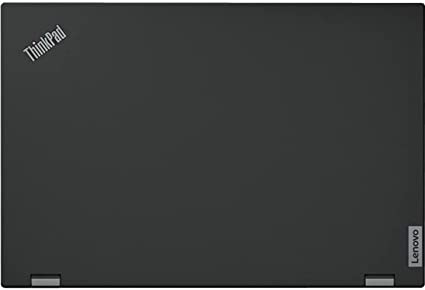
Top of the Thinkpad P15

Ease of Use: Thinkpad P15 Gen 2 Review

The Lenovo ThinkPad P15 Gen 2 20YQ0083US is designed with ease of use in mind. The device comes with a range of features and tools that make it easy to navigate and use, even for those who may not be familiar with the Windows 10 Pro operating system.

Touchpad and Keyboard

The device features a full-sized keyboard with a numeric keypad that is spill-resistant and backlit, making it easy to use in different lighting conditions. The keyboard is also comfortable to type on, with well-spaced keys that provide a satisfying tactile feedback.

The touchpad is smooth and responsive, making it easy to navigate the device. The device also comes with a range of gesture controls, such as pinch-to-zoom and swipe-to-scroll, which make it easy to interact with applications and files.

Connectivity

The device also comes with a range of connectivity options, including Thunderbolt 4 ports, USB 3.2 Gen 1 ports, HDMI, Ethernet, and a headphone/microphone combo jack. These connectivity options make it easy to connect to a range of peripherals and devices, such as external displays, hard drives, and printers.

The device also features Wi-Fi 6 and Bluetooth 5.1, ensuring fast and reliable wireless connectivity. The device is easy to set up and configure, with simple setup wizards that guide users through the process of connecting to a network and setting up security features.

Software

The device also comes with a range of pre-installed applications and tools, including Lenovo Vantage, which provides a range of system optimization and management tools. The device also comes with a range of security features, including a fingerprint scanner and an IR camera, which ensures secure login and authentication.

Overall

Overall, the Lenovo ThinkPad P15 Gen 2 20YQ0083US is easy to use and navigate, with a range of features and tools that make it a valuable tool for professionals. The device suits professionals seeking high performance and durability in a mobile workstation, with ease of use and configuration.

Value: Thinkpad P15 Gen 2 Review

The Lenovo ThinkPad P15 Gen 2 20YQ0083US is priced at around $3,200, which is a premium price tag. However, the device is packed with features and performance capabilities that justify its price. The device is ideal for professionals who require a high level of performance and durability in a mobile workstation. The device is optimized for demanding applications, such as video editing and 3D modeling, making it a valuable tool for professionals in those fields.

One of the main selling points of the Lenovo ThinkPad P15 Gen 2 20YQ0083US is its build quality. The device is built to withstand the rigors of daily use, with a sturdy magnesium alloy chassis that is designed to withstand drops, bumps, and other types of impact. The device is also spill-resistant, making it easy to clean and maintain.

Another advantage of the Lenovo ThinkPad P15 Gen 2 20YQ0083US is its security features. The device comes with a range of security features, including a fingerprint scanner and an IR camera, which ensures secure login and authentication. The device is also equipped with Windows 10 Pro, which is optimized for security and performance.

Price: Thinkpad P15 Gen 2 Review

In summary, the Lenovo ThinkPad P15 Gen 2 20YQ0083US stands out as an excellent mobile workstation tailored for professionals demanding top-tier performance and durability. It boasts a rich set of features, such as a robust processor, generous RAM and storage capacity, and a speedy GPU. Additionally, the device offers various connectivity options, facilitating seamless connections to a wide array of peripherals and devices.

However, the device does come with a premium price tag, which may make it difficult for some users to justify the cost. Additionally, the device may be too bulky and heavy for some users who require a more lightweight and portable device.

This Item is Retailing for $3,376.01

Thinkpad P15 Gen 2 Review
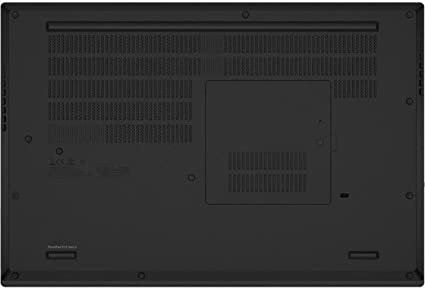
Bottom of the Thinkpad P15

Pros and Cons: Thinkpad P15 Gen 2 Review

Pros:

  1. Excellent Performance – The Lenovo ThinkPad P15 Gen 2 20YQ0083US is equipped with the latest Intel Core i7 11th Gen i7-11800H Octa-core processor, 32 GB of RAM, and 1 TB of SSD storage, making it ideal for demanding applications such as video editing, CAD, and 3D modeling.
  2. Durable and Sturdy Build – The device is built with a durable magnesium alloy chassis that is both sturdy and lightweight. The device is also spill-resistant, making it easy to clean and maintain.
  3. Security Features – The device comes with a range of security features, including a fingerprint scanner and an IR camera, which ensures secure login and authentication.
  4. Connectivity Options – The device comes with a range of connectivity options, including Thunderbolt 4 ports, USB 3.2 Gen 1 ports, HDMI, Ethernet, and a headphone/microphone combo jack, making it easy to connect to a range of peripherals and devices.
  5. Bright and Vibrant Display – The device features a 15.6-inch display that is available in Full HD resolution (1920 x 1080), which is perfect for professionals who require accurate colors and sharp images.

Cons:

  1. Premium Price Tag – The device comes with a premium price tag, which may make it difficult for some users to justify the cost.
  2. Heavy and Bulky – The device weighs just over 5 pounds, making it a bit heavier and bulkier than some other mobile workstations on the market.
  3. Limited Battery Life – While the device comes with a 90Wh battery, it is only capable of delivering up to 10 hours of battery life, which may not be enough for some users who require longer battery life.
  4. Limited Graphics Options – While the device comes with an NVIDIA Quadro T2000 GPU, it may not be enough for professionals who require a higher level of graphics performance.
  5. Limited Display Options – The device only comes with a Full HD display, which may not be sufficient for professionals who require a higher level of resolution and color accuracy.

Customer Reviews: Thinkpad P15 Gen 2 Review

The Lenovo ThinkPad P15 Gen 2 20YQ0083US has received generally positive reviews from customers who have purchased and used the device. Many customers have praised the device’s performance, durability, and security features.

Several customers have commented on the device’s build quality, noting that the magnesium alloy chassis feels sturdy and durable. Customers have also appreciated the spill-resistant keyboard and the fingerprint scanner, which provide added security and peace of mind.

Many customers have praised the device’s performance capabilities, noting that the Intel Core i7 processor and 32 GB of RAM provide more than enough power for demanding applications such as video editing and 3D modeling. Customers have also noted that the SSD storage provides fast boot times and quick application launches.

Customers have also appreciated the range of connectivity options available on the device, including Thunderbolt 4 ports, USB 3.2 Gen 1 ports, and HDMI. Customers have also praised the Wi-Fi 6 and Bluetooth 5.1 connectivity options, noting that they provide fast and reliable wireless connectivity.

The Drawbacks

However, some customers have noted that the device’s premium price tag may be a barrier for some users, and that the device’s weight and bulkiness may not be ideal for users who require a more portable device. Some customers have noted that professionals looking for a higher level of graphics performance may encounter limitations in the device’s graphics options.

Overall, the Lenovo ThinkPad P15 Gen 2 20YQ0083US has received positive reviews from customers, who have praised the device’s performance, durability, and security features. While not ideal for all users, the device is a fitting choice for professionals seeking a high level of performance and durability in a mobile workstation.

Final Verdict: Thinkpad P15 Gen 2 Review

To sum up, the Lenovo ThinkPad P15 Gen 2 20YQ0083US stands out as an excellent mobile workstation tailored for professionals needing top-tier performance and durability. It boasts a rich set of features, including a potent processor, abundant RAM and storage, and a rapid GPU. Moreover, the device is fortified with a range of security features, rendering it ideal for professionals handling sensitive data.

While the device may come with a premium price tag, it is well worth the investment for professionals who require a high level of performance and durability in a mobile workstation. Overall, the Lenovo ThinkPad P15 Gen 2 20YQ0083US is a solid choice for professionals in fields such as video editing, CAD, and 3D modeling.

Thanks For Reading!

I would like to take this opportunity to thank you very much for reading this Thinkpad P15 Gen 2 Review for 2023. I hope that this article has provided you with enough information to decide whether or not this machine is perfect for your home and if it will deliver everything you need a great piece of technology to deliver. At the very most I hope this Thinkpad P15 Gen 2 Review was enjoyable to read. Thanks again and I hope you enjoyed it!

Want to check out my other reviews go to https://thetechworldguru.com/category/computer-reviews/ for more reviews.

Thinkpad P15 4
Thinkpad
Standing Screen Display Size15.6 Inches
Screen Resolution1920 x 1080 pixels
Max Screen Resolution1920 x 1080 pixels
Processor2.3 GHz core_i7
Hard Drive1 TB SSD
Graphics CoprocessorNVIDIA RTX A4000
Chipset BrandNVIDIA
Card DescriptionRTX A4000
Graphics Card RAM Size8 GB
BrandLenovo
SeriesThinkPad P15 Gen 2
Item Model Number20YQ0083US
Hardware PlatformPC
Operating SystemWindows 11 Pro
Item Weight6.32 Pounds
Product Dimensions16.24 x 3.24 x 11.67 inches
Item Dimensions LxWxH16.24 x 3.24 x 11.67 inches
ColorBlack
Processor BrandIntel
Number of Processors1
Optical Drive TypeNo Information Available
Best Place to BuyBuy on Amazon
Thinkpad P15 Gen 2 Specifications
Disclosure:

In 2015, the Federal Trade Commission released its new rules for Disclosure Compliance. These rules are set in place to ensure that readers or viewers of web media (blogs, YouTube videos, etc.) know if the blogger/presenter is sponsored, endorsed, or partnered with a different company. In blog terms, the readers need to know if the blogger is making money by sharing a link or product.

In compliance with the FTC guidelines, please assume the following about links and posts on this site: Any/all of the links https://thetechworldguru.com/​ are affiliate links of which I receive a small compensation from sales of certain items.
Categories
Product Reviews

Msi Ge66 Review

Introduction: Msi Ge66 Review

Welcome to my MSI GE66 Review! I hope that in this article you will find the information you are about to receive to be very helpful in deciding if this piece of technology is right for you. This 2023 unbiased MSI GE66 Review will inform you of all of the machines bells and whistles and what to expect when getting this machine! Let’s jump into it!

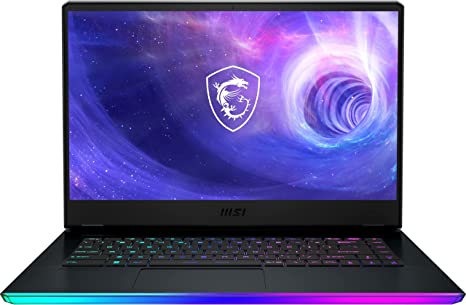
The MSI GE66 Raider stands out as a high-performance gaming laptop meticulously crafted for gamers who demand the best. Boasting top-of-the-line specifications, such as an Intel Core i9 processor, NVIDIA GeForce RTX 3080 graphics, and up to 32GB of RAM, this laptop guarantees a superior gaming experience. In this comprehensive MSI GE66 review, we will conduct an unbiased assessment of the MSI GE66 Raider, delving into its design, performance, gaming experience, connectivity, and overall value for money.

MSI GE66 Review

MSI GE66 Review
MSI GE66 Straight on
Standing Screen Display Size15.6 Inches
Screen Resolution3840×2160 Pixels
Max Screen Resolution3840×2160 Pixels
Processor1.8 GHz core_i9
RAM32 GB DDR5
Memory Speed4800 MHz
Hard Drive1 TB SSD
Graphics CoprocessorNVIDIA GeForce RTX 3080
Chipset BrandNVIDIA
Card DescriptionRTX 3080 Ti
Graphics Card RAM size16 GB
Wireless TypeBluetooth
Number of USB 3.0 Ports4
BrandMSI
SeriesRaider GE66 12UHS-235
Item Model NumberRaider GE66 12UHS-235
Hardware PlatformPC
Operating SystemWindows 11 Home
Item Weight5.25 Pounds
Product Dimensions14.5 x 20.7 x 4.4 inches
Item Dimensions LxWxH14.5 x 20.7 x 4.4 inches
Processor BrandIntel
Number of Processors1
Computer Memory TypeDDR4 SDRAM
Flash Memory Size1 TB
Optical Drive TypeNo Optical Drive
Voltage9 Volts
Batteries1 Lithium Ion batteries required. (included)
Best Place to BuyBuy on Amazon
MSI GE66 Raider Specifications

Design: Msi Ge66 Review

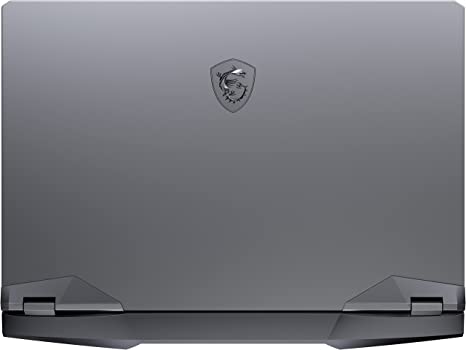
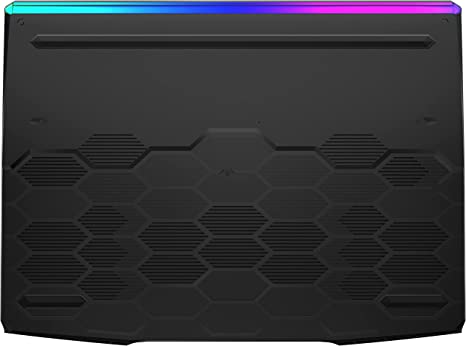
The MSI GE66 Raider has a sleek and stylish design that is both functional and visually appealing. The laptop has a sturdy and robust chassis constructed from aluminum, providing durability and lightweight design. The laptop’s Titanium Blue finish provides a unique and eye-catching design element.

The laptop’s keyboard boasts a full-sized layout with customizable RGB lighting, allowing users to adjust it according to their preferences. The laptop also features a large touchpad that is responsive and accurate, making it easy to navigate the Windows 10 operating system and perform various tasks.

Display:

The MSI GE66 Raider features a 15.6-inch UHD 4K (3840 x 2160) IPS anti-glare display that provides stunning visuals with accurate colors and wide viewing angles. The display also supports a refresh rate of 60Hz, making it suitable for demanding tasks that require high-quality visuals.

Performance: Msi Ge66 Review

The MSI GE66 Raider excels as a high-performance laptop crafted to tackle demanding workloads and games. The laptop features an Intel Core i9-11980HK processor, which provides exceptional performance with a base clock speed of 2.6GHz and a maximum turbo frequency of 5.0GHz.

The laptop’s NVIDIA GeForce RTX 3080 GPU with 16GB of dedicated GDDR6 memory provides exceptional graphics performance, allowing users to play the latest games at high settings with smooth and fluid visuals. The laptop also comes with 32GB of DDR4 RAM and a 2TB NVMe SSD, ensuring that the laptop can handle even the most demanding workloads and applications.

Gaming Experience: Msi Ge66 Review

The MSI GE66 Raider is designed to deliver an exceptional gaming experience, thanks to its top-of-the-line hardware and features. The laptop’s NVIDIA GeForce RTX 3080 GPU provides exceptional graphics performance, allowing users to play the latest games at high settings with smooth and fluid visuals.

The laptop’s UHD 4K display provides stunning visuals with accurate colors and wide viewing angles, ensuring that games look their best. The laptop’s customizable RGB keyboard also adds to the gaming experience, providing a personalized touch that can be adjusted to suit the user’s preferences.

The laptop’s range of connectivity options, including Thunderbolt 3 ports, USB 3.2 Gen 2 Type-A ports, and an HDMI 2.0b port, makes it easy to connect to a range of external devices. The laptop’s Wi-Fi 6 and Bluetooth 5.1 connectivity also make it easy to connect to wireless networks and devices.

However, the laptop’s large size and weight may make it less suitable for users who require a portable gaming device. Additionally, the laptop’s short battery life may be a concern for users who require a device that can last for extended gaming sessions without needing to be plugged in.

Ease of Use: Msi Ge66 Review

The MSI GE66 Raider is designed with user-friendliness in mind, making it easy to use for gamers who demand the best.

The laptop’s keyboard features a full-sized layout with customizable RGB lighting, making it easy to type and navigate the Windows 10 operating system. The laptop’s touchpad is also responsive and accurate, making it easy to navigate the system and perform various tasks.

The laptop’s Windows 10 operating system provides a user-friendly interface that is easy to navigate and customize. The laptop’s pre-installed software and drivers ensure that the device is ready to use right out of the box, without the need for additional setup.

The laptop’s range of connectivity options, including Thunderbolt 3 ports, USB 3.2 Gen 2 Type-A ports, and an HDMI 2.0b port, makes it easy to connect to a range of external devices. The laptop’s Wi-Fi 6 and Bluetooth 5.1 connectivity also make it easy to connect to wireless networks and devices.

However, the laptop’s large size and weight may make it less suitable for users who require a portable gaming device. Additionally, some users have reported that the laptop’s fan noise can be loud when running demanding applications.

Overall, the MSI GE66 Raider is easy to use, thanks to its user-friendly interface, comfortable keyboard, responsive touchpad, and range of connectivity options. Its customizable RGB keyboard also provides a personalized touch for users who demand the best.

MSI GE66 Review
Top of the MSI GE66

Value for Money: Msi Ge66 Review

The MSI GE66 Raider is a high-end gaming laptop that comes with a premium price tag. However, considering its top-of-the-line specifications and features, the laptop offers excellent value for money for gamers who demand the best.

Price: Msi Ge66 Review

This Item retails at $3,999.00

Pros And Cons: Msi Ge66 Review

Pros:

  1. High-Performance: The MSI GE66 Raider is designed to provide exceptional performance, making it suitable for demanding tasks such as gaming, video editing, and graphic design.
  2. Exceptional Graphics Performance: The laptop’s NVIDIA GeForce RTX 3080 GPU provides exceptional graphics performance, allowing users to play the latest games at high settings with smooth and fluid visuals.
  3. Stunning UHD 4K Display: The laptop’s UHD 4K display provides stunning visuals with accurate colors and wide viewing angles, ensuring that games and other media look their best.
  4. Customizable RGB Keyboard: The laptop’s customizable RGB keyboard adds to the gaming experience, providing a personalized touch that can be adjusted to suit the user’s preferences.
  5. Range of Connectivity Options: The laptop comes with a range of connectivity options, including Thunderbolt 3 ports, USB 3.2 Gen 2 Type-A ports, and an HDMI 2.0b port, making it easy to connect to a range of external devices.

Cons:

  1. Large Size and Weight: The MSI GE66 Raider is a large and heavy laptop, making it less suitable for users who require a portable gaming device.
  2. Short Battery Life: The laptop’s short battery life may be a concern for users who require a device that can last for extended gaming sessions without needing to be plugged in.
  3. Premium Price Tag: The MSI GE66 Raider comes with a premium price tag, making it expensive for users who are on a tight budget.

Customer Reviews: Msi Ge66 Review

The MSI GE66 Raider has received generally positive reviews from customers, with many praising its performance, graphics, and build quality. Customers have also appreciated the laptop’s range of connectivity options and customizable RGB keyboard.

However, some customers have complained about the laptop’s large size and weight, making it less suitable for users who require a portable gaming device. Additionally, some users have reported that the laptop’s battery life is relatively short, making it necessary to keep the device plugged in for extended gaming sessions.

MSI GE66 4
Customer Reviews

Final Verdict: Msi Ge66 Review

The MSI GE66 Raider is an exceptional gaming laptop that offers top-of-the-line specifications and features. The laptop’s powerful hardware, exceptional graphics performance, and customizable RGB keyboard make it an excellent choice for gamers who demand the best.

However, the laptop’s large size and weight may make it less suitable for users who require a portable gaming device. Additionally, the laptop’s short battery life may be a concern for users who require a device that can last for extended gaming sessions without needing to be plugged in.

Overall, the MSI GE66 Raider is an excellent choice for gamers who demand the best, thanks to its top-of-the-line hardware and features, and exceptional gaming experience.

Thanks For Reading!

I would like to take this opportunity to thank you very much for reading this MSI GE66 Review for 2023. I hope that this article has provided you with enough information to decide whether or not this machine is perfect for your home and if it will deliver everything you need a great piece of technology to deliver. At the very most I hope this MSI GE66 Review was enjoyable to read. Thanks again and I hope you enjoyed it!

Want to check out my other reviews go to https://thetechworldguru.com/category/computer-reviews/ for more reviews.

MSI GE66 Review
Standing Screen Display Size15.6 Inches
Screen Resolution3840×2160 Pixels
Max Screen Resolution3840×2160 Pixels
Processor1.8 GHz core_i9
RAM32 GB DDR5
Memory Speed4800 MHz
Hard Drive1 TB SSD
Graphics CoprocessorNVIDIA GeForce RTX 3080
Chipset BrandNVIDIA
Card DescriptionRTX 3080 Ti
Graphics Card RAM size16 GB
Wireless TypeBluetooth
Number of USB 3.0 Ports4
BrandMSI
SeriesRaider GE66 12UHS-235
Item Model NumberRaider GE66 12UHS-235
Hardware PlatformPC
Operating SystemWindows 11 Home
Item Weight5.25 Pounds
Product Dimensions14.5 x 20.7 x 4.4 inches
Item Dimensions LxWxH14.5 x 20.7 x 4.4 inches
Processor BrandIntel
Number of Processors1
Computer Memory TypeDDR4 SDRAM
Flash Memory Size1 TB
Optical Drive TypeNo Optical Drive
Voltage9 Volts
Batteries1 Lithium Ion batteries required. (included)
Best Place to BuyBuy on Amazon
MSI GE66 Raider Specifications
Disclosure:

In 2015, the Federal Trade Commission released its new rules for Disclosure Compliance. These rules are set in place to ensure that readers or viewers of web media (blogs, YouTube videos, etc.) know if the blogger/presenter is sponsored, endorsed, or partnered with a different company. In blog terms, the readers need to know if the blogger is making money by sharing a link or product.

In compliance with the FTC guidelines, please assume the following about links and posts on this site: Any/all of the links https://thetechworldguru.com/​ are affiliate links of which I receive a small compensation from sales of certain items.

Categories
Product Reviews

Dell Precision 3561 Review

Introduction: Dell Precision 3561 Review

Welcome to my Dell Precision 3561 Review! I hope that in this article you will find the information you are about to receive to be very helpful in deciding if this piece of technology is right for you. This 2023 unbiased Dell Precision 3561 Review will inform you of all of the machines bells and whistles and what to expect when getting this machine! Let’s jump into it!

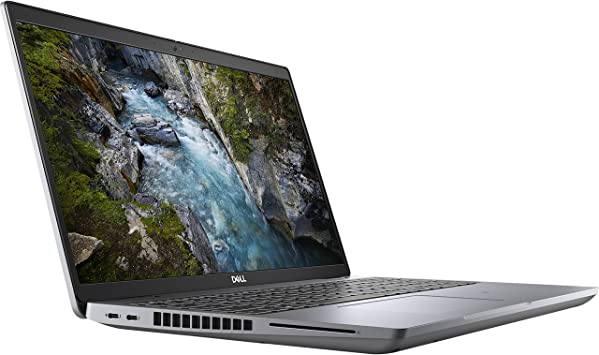
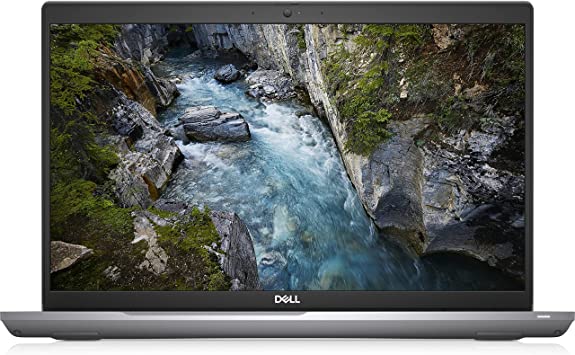
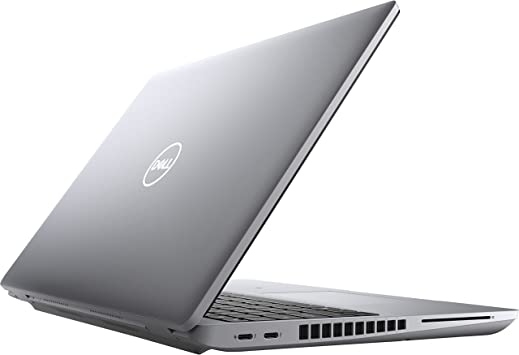
The Dell Precision 3561 is a high-performance mobile workstation designed for professionals who require a powerful and reliable device for demanding workloads. This laptop features top-of-the-line specifications, including an Intel Core i7 processor, NVIDIA Quadro T500 graphics, and up to 64GB of RAM. In this Dell Precision 3561 Review, we will provide an unbiased assessment of the Dell Precision 3561, including its design, performance, connectivity, security features, and value for money.

Dell Precision 3561 Review

Dell Precision 3561 Review
Dell Precision 3561
Standing Screen Display Size15.6 Inches
Screen Resolution1920 x 1080 Pixels
Max Screen Resolution1920 x 1080 Pixels
Processor2.5 GHz core_i7_family
RAM32 GB DDR4
Memory Speed2.5 GHz
Hard Drive512 GB SSD
Graphics CoprocessorNVIDIA T600
Chipset BrandNVIDIA
Card DescriptionT600
Graphics Card Ram Size4 GB
Wireless TypeBluetooth, 802.11ax
BrandDell
SeriesPrecision 3000
Item Model Number3561
Hardware PlatformPC
Operating SystemWindows 10 Pro
Item Weight3.95 Pounds
Product Dimensions9.2 x 14.1 x 0.95 inches
Item Dimensions LxWxH9.2 x 14.1 x 0.95 inches
ColorTitan Gray
Processor BrandIntel
Number of Processors1
Computer Memory TypeDDR4 SDRAM
Flash Memory Size512 GB
Best Place to BuyBuy on Amazon
Dell Precision 3561 Specifications

Design: Dell Precision 3561 Review

The Dell Precision 3561 has a sleek and modern design that is both functional and stylish. The laptop features a robust and sturdy chassis that is made of aluminum, making it durable and lightweight. The laptop’s Titan Gray finish provides a unique and eye-catching design element.

The laptop’s keyboard features a full-sized layout with a comfortable typing experience, making it suitable for long typing sessions. The laptop also features a large touchpad that is responsive and accurate, making it easy to navigate the Windows 10 operating system and perform various tasks.

Display:

The Dell Precision 3561 features a 15.6-inch Full HD (1920 x 1080) IPS display that provides sharp and vibrant visuals, with accurate colors and wide viewing angles. The display also supports a refresh rate of 60Hz, making it suitable for demanding tasks that require high-quality visuals.

Performance: Dell Precision 3561 Review

The Dell Precision 3561 is a high-performance laptop that is designed to handle demanding workloads. The laptop features an Intel Core i7-11850H processor, which provides exceptional performance with a base clock speed of 2.5GHz and a maximum turbo frequency of 4.8GHz.

The laptop’s NVIDIA Quadro T500 GPU with 4GB of dedicated GDDR6 memory provides exceptional graphics performance, allowing users to run demanding applications with ease. The laptop also comes with 32GB of DDR4 RAM and a 512GB SSD, ensuring that the laptop can handle even the most demanding workloads and applications.

Connectivity:

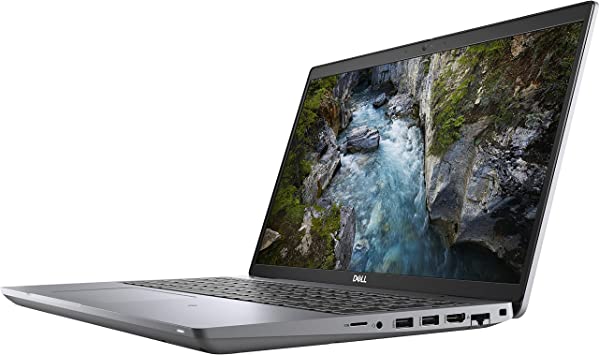
The Dell Precision 3561 comes with a range of connectivity options, including Wi-Fi 6, Bluetooth 5.1, and a range of ports for connecting peripherals and external devices. The laptop’s Thunderbolt 4 ports provide fast data transfer speeds and support for multiple displays, while the USB 3.2 Gen 1 Type-A ports are useful for connecting peripherals such as a mouse or keyboard.

The laptop also features an HDMI 2.0 port, which supports 4K at 60Hz, making it suitable for connecting to external displays such as TVs or monitors.

Security Features:

The Dell Precision 3561 comes with a range of security features to protect users’ data and privacy. The laptop features a Windows Hello compatible fingerprint reader that allows users to log in to their device with just a touch of a finger. The laptop also features a TPM 2.0 chip, which provides hardware-based encryption to protect sensitive data. Additionally, the laptop features a built-in webcam cover, which can be manually slid over the webcam to ensure privacy when not in use.

Dell Precision 3561 Review
Straight On

Ease of Use: Dell Precision 3561 Review

The Dell Precision 3561 is designed with user-friendliness in mind, making it easy to use for professionals who require a high-performance device for demanding workloads.

The laptop’s keyboard features a full-sized layout with a comfortable typing experience, making it suitable for long typing sessions. The laptop’s touchpad is also responsive and accurate, making it easy to navigate the Windows 10 operating system and perform various tasks.

The laptop’s Windows 10 operating system provides a user-friendly interface that is easy to navigate and customize. The laptop’s pre-installed software and drivers ensure that the device is ready to use right out of the box, without the need for additional setup.

The laptop’s range of connectivity options, including Thunderbolt 4 ports, USB 3.2 Gen 1 Type-A ports, and an HDMI 2.0 port, makes it easy to connect to a range of external devices. The laptop’s Wi-Fi 6 and Bluetooth 5.1 connectivity also make it easy to connect to wireless networks and devices.

Additionally, the laptop’s security features, including the Windows Hello compatible fingerprint reader and built-in webcam cover, provide added convenience and peace of mind.

However, the laptop’s limited storage capacity may be a concern for users who require a large amount of storage space for media files and applications. Additionally, some users have reported that the laptop’s fans can be noisy when running demanding applications.

Overall, the Dell Precision 3561 is easy to use, thanks to its user-friendly interface, comfortable keyboard, responsive touchpad, and range of connectivity options. Its security features also provide added convenience and peace of mind.

Value for Money: Dell Precision 3561 Review

The Dell Precision 3561 is a high-end mobile workstation that comes with a premium price tag. However, considering its top-of-the-line specifications and features, the laptop offers excellent value for money for users who require a high-performance device for demanding tasks such as video editing, 3D modeling, and CAD design.

Price: Dell Precision 3561 Review

This item is retailing at $3,489.83

Dell Precision 3561 Review
Left Side and Back

Pros And Cons: Dell Precision 3561 Review

Pros:

  1. High-Performance: The Dell Precision 3561 is designed to provide exceptional performance, making it suitable for demanding tasks such as video editing, 3D modeling, and CAD design.
  2. Excellent Graphics Performance: The laptop’s NVIDIA Quadro T500 GPU with 4GB of dedicated GDDR6 memory provides exceptional graphics performance, allowing users to run demanding applications with ease
  3. Range of Connectivity Options: The laptop comes with a range of connectivity options, including Thunderbolt 4 ports, USB 3.2 Gen 1 Type-A ports, and an HDMI 2.0 port, making it suitable for connecting to a range of external devices.
  4. Security Features: The laptop features a range of security features, including a Windows Hello compatible fingerprint reader, TPM 2.0 chip, and a built-in webcam cover, ensuring users’ data and privacy are protected.
  5. Durable and Lightweight: The laptop’s aluminum chassis makes it both durable and lightweight, ensuring that it can withstand the rigors of daily use and be easily transported.

Cons:

  1. Premium Price Tag: The Dell Precision 3561 comes with a premium price tag, making it expensive for users who are on a tight budget.
  2. No 4K Display: The laptop’s Full HD display is not 4K, making it less suitable for users who require a high-resolution display for tasks such as video editing and graphic design.
  3. Limited Storage Capacity: The laptop’s 512GB SSD may not be sufficient for users who require a large amount of storage space for media files and applications.

Customer Reviews: Dell Precision 3561 Review

The Dell Precision 3561 has received generally positive reviews from customers, with many praising its performance, graphics, and build quality. Customers have also appreciated the laptop’s range of connectivity options and security features.

However, some customers have complained about the laptop’s premium price tag, limited storage capacity, and lack of a 4K display. Additionally, some users have reported that the laptop’s fans can be noisy when running demanding applications.

Final Verdict: Dell Precision 3561 Review

The Dell Precision 3561 is a high-performance mobile workstation that offers top-of-the-line specifications and features. The laptop’s powerful hardware, excellent graphics performance, and range of connectivity options make it suitable for demanding tasks such as video editing, 3D modeling, and CAD design.

However, the laptop’s premium price tag, limited storage capacity, and lack of a 4K display may make it less suitable for users who are on a tight budget or require a high-resolution display. Overall, the Dell Precision 3561 is an excellent choice for professionals who require a high-performance device for demanding workloads.

Thanks For Reading!

I would like to take this opportunity to thank you very much for reading this Dell Precision 3561 Review for 2023. I hope that this article has provided you with enough information to decide whether or not this machine is perfect for your home and if it will deliver everything you need a great piece of technology to deliver. At the very most I hope this Dell Precision 3561 Review was enjoyable to read. Thanks again and I hope you enjoyed it!

Want to check out my other reviews go to https://thetechworldguru.com/category/computer-reviews/ for more reviews.

DELL 3561 4
Right Side
Standing Screen Display Size15.6 Inches
Screen Resolution1920 x 1080 Pixels
Max Screen Resolution1920 x 1080 Pixels
Processor2.5 GHz core_i7_family
RAM32 GB DDR4
Memory Speed2.5 GHz
Hard Drive512 GB SSD
Graphics CoprocessorNVIDIA T600
Chipset BrandNVIDIA
Card DescriptionT600
Graphics Card Ram Size4 GB
Wireless TypeBluetooth, 802.11ax
BrandDell
SeriesPrecision 3000
Item Model Number3561
Hardware PlatformPC
Operating SystemWindows 10 Pro
Item Weight3.95 Pounds
Product Dimensions9.2 x 14.1 x 0.95 inches
Item Dimensions LxWxH9.2 x 14.1 x 0.95 inches
ColorTitan Gray
Processor BrandIntel
Number of Processors1
Computer Memory TypeDDR4 SDRAM
Flash Memory Size512 GB
Best Place to BuyBuy on Amazon
Dell Precision 3561 Specifications
Disclosure:

In 2015, the Federal Trade Commission released its new rules for Disclosure Compliance. These rules are set in place to ensure that readers or viewers of web media (blogs, YouTube videos, etc.) know if the blogger/presenter is sponsored, endorsed, or partnered with a different company. In blog terms, the readers need to know if the blogger is making money by sharing a link or product.

In compliance with the FTC guidelines, please assume the following about links and posts on this site: Any/all of the links https://thetechworldguru.com/​ are affiliate links of which I receive a small compensation from sales of certain items.